How the Ticketmaster Queue Actually Works (And How to Get Through It)
You joined the queue ten minutes early. You watched the countdown hit zero. And then Ticketmaster told you there were 14,000 people ahead of you. Meanwhile, your mate who joined two minutes late got straight through and bagged floor tickets. It feels rigged. It's not. The queue just doesn't work the way most people think it does.
TL;DR
- The Ticketmaster queue is randomised. Joining early gets you into the waiting room, but your position is assigned randomly when the sale starts.
- You need to be in the waiting room before the on-sale time. If you join after, you go to the back of a first-come, first-served queue.
- Multiple devices and browsers can give you multiple queue positions, which genuinely improves your odds.
- Don't refresh the page once you're in the queue. Ever.
- Know the exact on-sale time by tracking it on Evnt Central. Being late to the waiting room is the single biggest mistake people make.
How does the Ticketmaster queue work?
The Ticketmaster queue has two distinct phases: the waiting room and the active queue. Understanding the difference is the whole game.
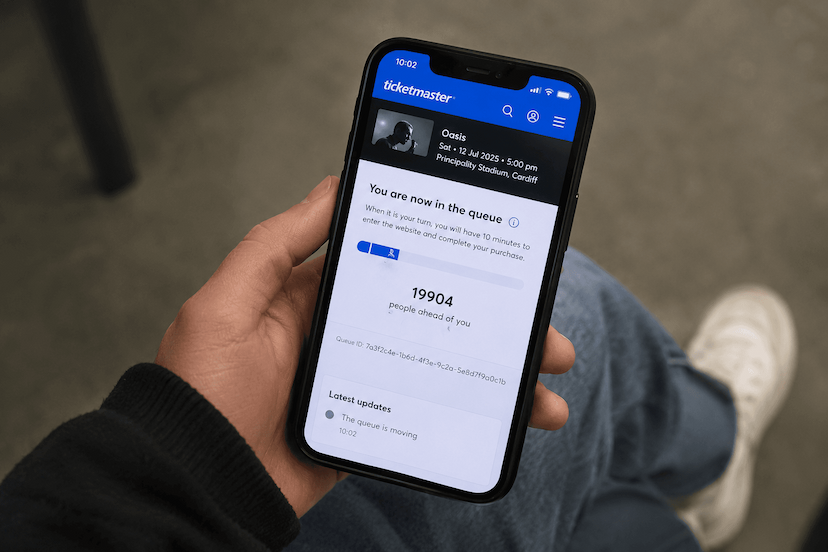
The waiting room opens roughly 10 to 30 minutes before the advertised on-sale time. During this window, everyone who joins is held in a virtual holding area. No one is being served yet. You're just registering your place. When the on-sale time hits, Ticketmaster randomly assigns everyone in the waiting room a position in the active queue. That's the number you see ("2,000+ people ahead of you"), and from that point it's a standard first-in-first-out line.
The critical bit: your position is random, not based on when you joined the waiting room. Whether you got there 20 minutes early or 20 seconds early, you have the same odds. Ticketmaster has confirmed this publicly, and it's been their system since they rolled out the Smart Queue technology.
Does joining the Ticketmaster queue early help?
No. As long as you're in the waiting room before the on-sale time, it makes no difference whether you joined 30 minutes early or 30 seconds early. Your queue position is randomly assigned when the clock hits zero.
Where timing does matter is if you join after the sale has started. Once the randomised positions are assigned and the queue is moving, anyone who arrives late gets placed at the back in the order they joined. So you go from a random lottery to a pure footrace, and you've already lost.
This is why knowing the exact on-sale time is non-negotiable. If you're even a minute late, you're behind everyone who was in the waiting room. Evnt Central tracks on-sale dates and times for UK concerts. Set up an alert so you're not relying on memory or a half-remembered Instagram story.
Why did my friend get a better queue position than me?
Because it's random. That's it. There's no conspiracy, no secret priority for certain accounts, and Ticketmaster isn't favouring people who've bought more tickets in the past. The randomisation is genuinely random.
It stings when you were sat there refreshing the page five minutes before the sale and your friend casually joined from the toilet at the last second and got through first. But that's how a lottery works. It doesn't reward effort, it rewards luck.
The only thing that isn't random is if someone has a presale code and accessed an earlier presale window. Those tickets were bought from a separate allocation before the general sale even opened, so they weren't competing in your queue at all.
Does using multiple devices actually help?
Yes, and this is one of the few tips that genuinely shifts the odds in your favour. Each device or browser session gets its own independent queue position. So if you've got your phone on the Ticketmaster app, a laptop on the website, and a tablet on a second browser, that's three separate rolls of the dice.
A few rules to make this work properly:
- Use different browsers or devices, not just different tabs. Multiple tabs in the same browser often share a session, which means you might only get one queue position across all of them.
- The Ticketmaster app counts as a separate session from the website, so always have the app open as well.
- You can also ask someone else to queue on their own account and devices. More people, more chances.
- Don't log into the same Ticketmaster account on every device. Ticketmaster has flagged sessions that look like bot activity in the past. Use your own account on one or two devices, and have a friend use theirs on the rest.
This isn't a hack. It's just basic probability. More queue positions means a higher chance that at least one of them lands near the front.
Should I use the Ticketmaster app or the website?
There's no confirmed advantage to either one, but anecdotally, the desktop website tends to be more stable during high-demand sales. The app can lag, crash, or fail to load the seat map under heavy traffic. The website isn't immune to this, but it handles load slightly better in most people's experience.
The best strategy is to use both. App on your phone, website on your laptop. They're independent sessions, so you're doubling your chances anyway.
One thing to watch: if you get through on one device, don't abandon your other queues until you've actually completed the purchase and have a confirmation email. Tickets aren't secured until payment goes through. If something fails at checkout, your other session might still be working its way through.
What happens when I get to the front of the queue?
When it's your turn, Ticketmaster holds your session for a limited time, usually around 8 to 10 minutes, to select and purchase tickets. If you don't complete the transaction in time, your session expires and those tickets go back into the pool.
This is where preparation matters more than anything. Before the queue even opens, you should:
- Be logged into your Ticketmaster account with your payment details saved.
- Know exactly what you want. Which date (if it's a multi-date tour), which section, how many tickets. Don't waste time browsing the seat map like it's a restaurant menu.
- Have a backup plan. If your ideal section is gone, know your second and third choices. Hesitating for 30 seconds while you Google "is Block 112 any good" can cost you the lot.
The seat map loads dynamically. Available sections are colour-coded and sold-out ones are greyed out. Pick a section, pick your seats (or let Ticketmaster assign "best available"), and get to checkout immediately.
Does refreshing the page lose my place in the queue?
Yes. Refreshing the page while you're in the active queue will almost certainly reset your session and send you to the back. This is the single most common mistake people make, and it's brutal because it feels like the natural thing to do when the page seems frozen.
The queue page doesn't always look like it's doing something. The progress bar might sit still for minutes. The "people ahead of you" number might not update for a while. This is normal. The page is polling Ticketmaster's servers in the background, and it will update and redirect you automatically when it's your turn.
If the page genuinely crashes (like a full browser error), that's different and you'll have no choice but to reload. But otherwise, leave it alone. Go make a cup of tea. Don't touch it.
Can Ticketmaster detect bots in the queue?
Yes. Ticketmaster uses a system that monitors for automated behaviour, and it's become significantly more aggressive in recent years. Bot-like activity like extremely fast interactions, unusual browsing patterns, or running scripts can get your session flagged and either slowed down or removed from the queue entirely.
For normal users, this isn't something you need to worry about. But some of the "tricks" you see shared online, like browser extensions that auto-refresh or scripts that auto-select tickets, can actually trigger Ticketmaster's detection and hurt your chances. Stick to manual, human behaviour and you'll be fine.
What time do Ticketmaster tickets usually go on sale in the UK?
Most general sales in the UK go live at 10am on a Friday. This has been the standard for years, though it's not a hard rule. Some go on sale at 9am, and presales often open on a Wednesday or Thursday.
The on-sale time is always listed on the event page on Ticketmaster, but the problem is finding out about the sale early enough to plan for it. If you're hearing about it for the first time on the morning of, you're already behind. Use Evnt Central to track upcoming on-sale dates for artists you care about. You'll get an alert well in advance so you can be ready, not scrambling.
The short version
Get into the waiting room early, don't refresh, use multiple devices, and have your payment details ready before the sale starts. The queue is random, so you can't game it. But you can avoid the mistakes that knock most people out. Track on-sale dates with Evnt Central so you're never caught off guard, and give yourself the best shot at being there when it matters.